Improve Google Search Rank: 6 Steps That Work in 2026
Learn how to improve Google search rank with a diagnosis-first plan: fix crawl issues, sharpen content, and earn links that count.
Publish more content, build more links, tweak every title. That's the standard advice for anyone trying to improve Google search rank, and it's usually wrong as a starting point. Most stalled pages don't have five problems. They have one bottleneck that makes the other work look ineffective. I would diagnose that bottleneck first, fix only the matching area, and judge the result by clicks and conversions, not by position alone. A higher ranking that brings the wrong visitors, or no visitors at all, isn't progress.
Why Rankings Stall and Where to Look First
Most stalled pages have one bottleneck, not five. If you rewrite content, change titles and chase links in the same month, you won't know what helped, and you'll probably spend on the wrong fix. Start by isolating the constraint.
Before any other check, open the Manual actions and Security issues reports in Google Search Console. A manual action overrides every other diagnosis. If there's one, fix the violation and request reconsideration before touching content or links.
Reading One Page in Search Console
Open the Performance report, filter to a single URL, and pull the last 28 days of impressions, average position and CTR. Then compare that view with the prior 90 days. You're looking for a pattern, not a single number. Is the page climbing slowly, flat, or falling? Are impressions rising while position holds? That combination tells you where to start.
| Signal in Search Console or audit | Likely bottleneck | First fix area |
|---|---|---|
| Impressions flat and page missing from the index | Crawl or indexing block | Technical blockers |
| Indexed, impressions rising, position 8-20 | Weak relevance or thin content | Content quality |
| Position 3-10 with CTR below similar results | Title and snippet mismatch | On-page elements |
| Strong content, no movement after 3+ months | Few or weak editorial links | Link acquisition |
| Traffic falling after a core update | Quality or intent mismatch | Content review against top results |
| Rankings hold, conversions low | Wrong query or weak next step | Intent and conversion path |
Say a pricing page sits at position 14 for its money query with 4,000 monthly impressions. That's a relevance or depth problem, so rewriting the title won't fix it. The same page at position 4 with a 1.2% CTR points the other way. Searchers see it and skip it, so the title and snippet are the first fix.
Practical rule: Name one bottleneck, make one matching fix, and set a review date before you change anything else.
Set honest expectations. Content and title edits typically need two to four weeks for Google to recrawl and reassess a page. Link gains often take three to six months to show in rankings and traffic. Pick your bottleneck from the table, then go straight to the fix area it points to.
How to Fix Technical Blockers in the Right Order
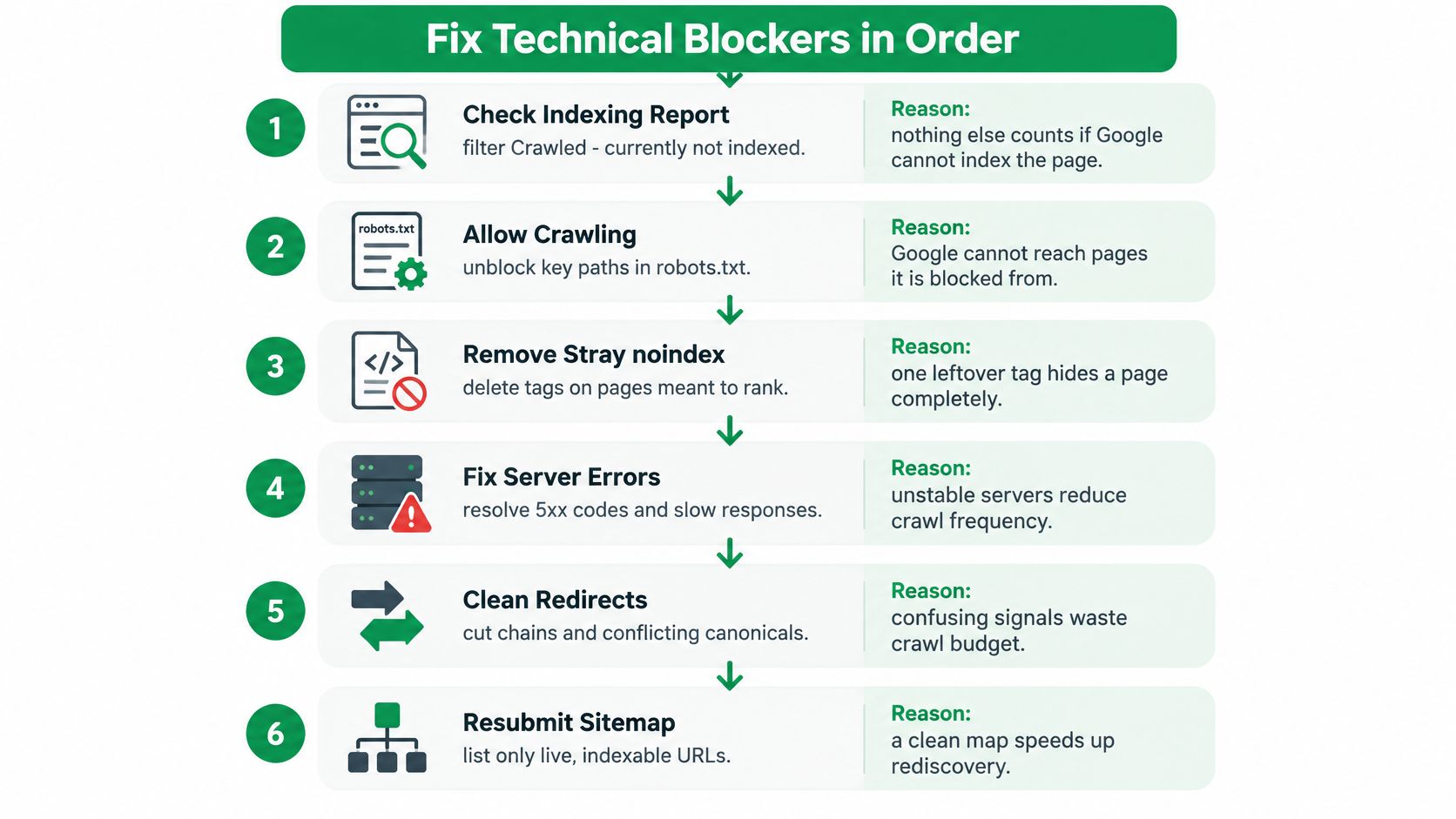
Nothing else counts on a page Google can't reach or index. Work through these checks in order, because each step makes the next one meaningful. The visual below summarises the sequence.
The Six Checks in Order
- Check the Page indexing report. Filter for "Crawled - currently not indexed" and "Discovered - currently not indexed." These URLs need a reason to be indexed, such as stronger internal links or better content, not automatic dismissal.
- Inspect robots.txt and noindex tags. One stray disallow rule can hide a whole directory, and a leftover noindex from staging can hide a launch page completely. Check every target URL individually.
- Set one canonical version. Pick one protocol, host and trailing slash format, then point duplicates at it with canonical tags. Conflicting versions split signals and confuse crawling.
- Rebuild the XML sitemap. List only indexable pages that return status 200. A sitemap full of redirects and blocked URLs wastes crawl attention and hides your priority pages.
- Cut redirect chains. Replace any chain longer than one hop with a direct redirect, and repoint internal links that lead to 404s. Don't make Google follow a trail to reach a live page.
- Fix the worst Core Web Vitals failure first. It's usually a heavy hero image delaying LCP or a script blocking interaction. Fix one failing metric, retest, then move to the next.
| Metric | Good | Needs improvement | Poor |
|---|---|---|---|
| LCP (Largest Contentful Paint) | 2.5 s or less | 2.5-4 s | Over 4 s |
| INP (Interaction to Next Paint) | 200 ms or less | 200-500 ms | Over 500 ms |
| CLS (Cumulative Layout Shift) | 0.1 or less | 0.1-0.25 | Over 0.25 |
Speed clears the way for relevance signals. It doesn't rank a page by itself. A fast page with the wrong intent still loses, but a slow or blocked page never gets judged on its content at all.
The walkthrough below shows the inspection workflow in practice.
You'll know you're done when the URL shows as indexed in Search Console, the live test passes, and recrawl requests are accepted. If a fixed page still isn't indexed within about a week, the problem is usually weak internal linking or content Google doesn't consider worth storing, which takes you to the next fix.
How to Make Pages Worth Ranking Higher
Start with search intent, because a format mismatch explains most ranking ceilings. Review the top five results for your target query and note what they are. Guides, tools, comparisons or product pages? If they're all product pages and you've published a blog post, no amount of editing will close that gap. Match the format searchers are currently choosing, then beat it on usefulness.
The image below reflects that inspection step, comparing page types before you rewrite anything.

What Actually Lifts a Page
Answer the core question within the first 100 words. Readers who find the answer fast keep reading for detail. Readers who have to scroll through an introduction go back to the results. Then add what competitors can't copy easily, such as test results, process photos, screenshots, or numbers from your own data. First-hand evidence is the hardest thing for a generic page to match.
Cut as much as you add. Remove sections that repeat each other in different words, and delete advice that doesn't help the reader act. A shorter page that answers completely beats a padded page every time. Word count alone isn't a signal, so don't stretch a page to hit a number.
A page earns a higher rank when a reader can stop searching after it. If they'd still need a second tab, the page isn't finished.
Consolidation and Refresh
When three thin posts target near-identical queries, merge them into one stronger page and 301 redirect the others to it. One page that covers the topic properly usually outperforms three pages splitting the same intent and internal links.
Consider a SaaS glossary page of 1,800 words stuck around position 22. Replacing generic definitions with screenshots and one worked example can lift a page like that into the top 10, because it now shows the thing instead of describing it in circles. The length barely changed. The usefulness did.
Set a refresh cadence. Review your top 20 pages every six months, update dated statistics and examples, and check whether the top results have changed format. Google rewards content written for people first, with original value compared with other results. I would end every rewrite with one test. Would a reader stop searching after this page? If not, keep editing.
On-Page Changes That Make Relevance Obvious
Work in priority order. The title tag and H1 carry the most weight for relevance, because they tell Google and searchers what the page is. The meta description doesn't move rank directly, but it decides whether someone clicks. Internal links decide which pages get crawled often and how much topical context they receive.
Say a B2B invoicing page is titled "Our Platform." That title matches no query and promises nothing. Rewrite it as "Invoicing Software for Agencies: Setup in One Afternoon," give it an H1 that matches the searcher's language, and write a meta description naming the outcome, such as sending the first invoice the same day. The page didn't change. Its relevance became obvious.
Anchors, Images and Markup
- Internal anchor text: Describe the destination instead of repeating one exact-match phrase across hundreds of pages. Replace "click here" with "recurring invoice setup guide," and vary wording naturally. A clear anchor text example shows how descriptive anchors read in context.
- Image alt text: Describe what the image shows. Rename "image1" to "tax calculation steps diagram" so the file and alt text both carry meaning.
- Structured data: Use only markup that matches visible content. Add FAQ markup only when those questions and answers appear on the page, and don't expect FAQ rich results on demand, since Google shows them for a limited set of sites.
The 20-minute audit: Find duplicate titles across the site, then rewrite the five high-impression pages whose CTR sits below average for their position.
Don't rewrite every title at once. Change the five, wait for recrawling, and compare CTR against the previous period. If CTR rises and position holds, the snippet was the bottleneck. If nothing moves, your problem is relevance or authority, not wording.
How to Earn Links Google Actually Counts
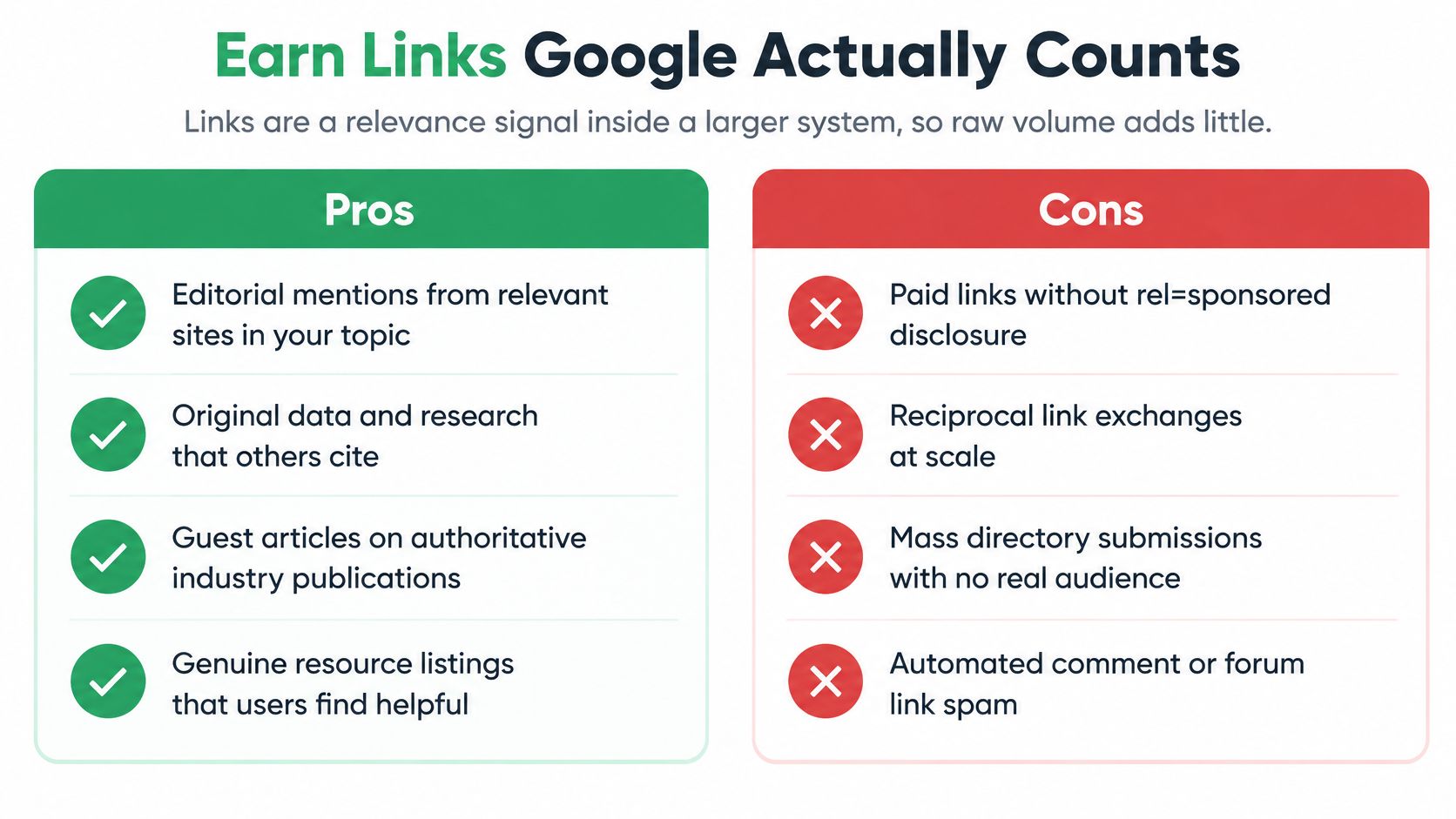
Buying 100 links won't fix a page Google doesn't trust for the query. Links work as a relevance signal inside a larger system: raw volume adds little, and manipulative volume adds risk. Google classifies buying or selling links for ranking purposes and excessive link exchanges as link spam, which can lower rankings or remove a site from Search. Authority becomes the bottleneck only after technical health and page relevance are already confirmed, so diagnose that before spending on outreach.
The comparison below separates placements with editorial value from patterns that create risk.
The Filter to Apply Before Outreach
Confirm topical fit between the referring page and your target. Check that the referring page has a real audience and earns its own search traffic. Make sure the anchor describes the linked resource naturally, and confirm the placement has an editorial reason to exist beyond passing value. Reject domains built to sell links, reciprocal exchanges, sites with no traffic, and placements whose main purpose is ranking.
Four routes hold up under that filter:
- Original research journalists and writers cite because the data strengthens their story.
- A useful free tool people reference on their own.
- Guest articles where the publisher approves the topic and a subject-matter expert writes the piece.
- Editor relationships where your page earns the link because it helps their readers, including well-chosen niche edit links inside existing relevant articles.
Vet every prospect with five checks: referring-page traffic in Ahrefs or Semrush, topical relevance of the page, indexability, link attributes, and whether the link is still live after 90 days. The same standard drives screening at Linkbuilding.services: white-hat methods only, no dead sites, PBNs, or domains without an audience, and publisher matching built on Ahrefs, Semrush, and the company's own research into each client's niche.
| Link source | Editorial context | Verdict |
|---|---|---|
| Relevant article on a site with real search traffic | Link in body text, topic matches the page | Likely to help |
| Guest post with expert content and an approved topic | Useful contribution the editor chose to publish | Helps when the site has a real audience |
| Paid placement sold for ranking purposes | Link exists mainly to pass value | Risky; Google classes it as link spam |
| Reciprocal link exchanges at scale | Links traded between sites | Violates guidelines |
| Sitewide footer or blogroll from unrelated sites | No topical context | Low value |
| Original research cited by journalists | Earned because the data is useful | Strongest option |
A live link is a starting point. The win shows up as traffic and conversions on the target page, because position alone proves less now that AI answers pull clicks from the top results.
Measure Real Gains and Plan Your Next Sprint
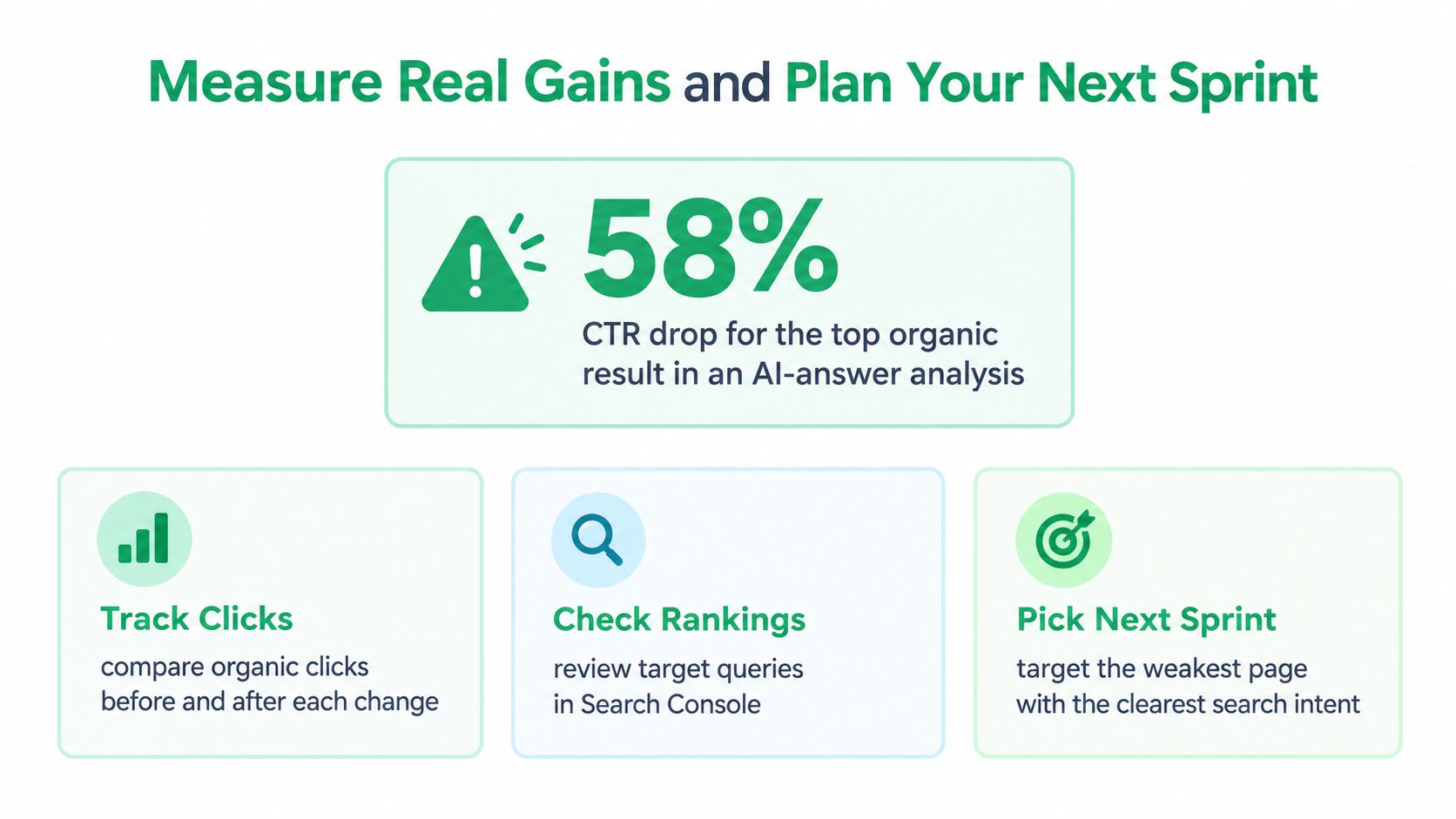
Position one isn't worth what it was. A Marketing Miner roundup of June 2025 SEO news reports one analysis showing an approximately 58% reduction in click-through rate for the top organic result when an AI Overview appears, and a separate study where informational-query CTR fell from 1.76% to 0.61%. You can improve Google search rank and still get fewer visits than expected. That's why outcomes matter more than positions.
The summary below pairs that click loss with the measurement habits that keep reporting honest.
Setting up an Honest Test
Record a 28-day baseline before each change. Choose a matched set of untouched pages with similar starting positions as controls, and set a review window of eight to twelve weeks. If your target page and the control pages rise together, you're probably looking at seasonality or a broad update, not your work. A gain only counts when the target moves and the controls don't.
| Metric | Where to find it | What it proves |
|---|---|---|
| Impressions and average position for target queries | Search Console Performance report, filtered to the page | Whether the page is gaining visibility for target queries |
| Clicks and CTR | Search Console Performance report | Whether the title and snippet earn visits |
| Branded search volume | Search Console query filter or Google Trends | Demand beyond rankings |
| Conversions from organic landing pages | GA4 landing page report | Business outcome from search traffic |
| Change on matched non-target pages | Same report, untouched pages | Whether the gain is specific to the work |
| Referring domains to the target page | Ahrefs, Semrush or Search Console Links report | Link growth, checked for relevance and status |
No provider can guarantee rankings or revenue. We don't guarantee specific rankings, traffic amounts, or revenue outcomes, and we provide live reporting on link building campaigns so clients can judge results from their own numbers. You should hold any plan to that standard.
For your next sprint, pick one bottleneck, apply the matching fix, and set a review date eight weeks out. If impressions rise but conversions don't, go back to intent and the conversion path before you pursue more links.
If your diagnosis points to weak editorial links, we can research publishers with real traffic in your niche, secure placements you'd approve in advance, and report every live URL so you can measure the result against your baseline. Visit Linkbuilding.services to see how a managed link campaign would fit your target pages and budget.
Refined using Outrank tool